Running out of free memory during acquisition in CatWalk XT
Last updated: Nov 07, 2025
Insufficient Memory Error During Acquisition
During acquisition, you may see this error message:
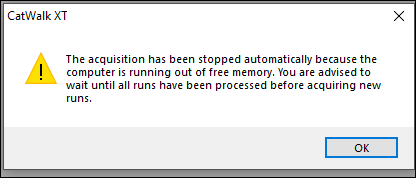
This indicates there is insufficient free memory to record acquisition data. Common causes include:
- Insufficient RAM
- Other applications running in the background
- Excessively long runs
- Unclean walkway or camera noise
- Walkway ceiling being open during trials
Recommended Solutions
Update CatWalk
This issue is resolved in CatWalk XT 10.7, available through MyNoldus. This is a free upgrade for users of CatWalk XT 10.0 or later.
Note: CatWalk XT 10.7 requires the newer control unit (a black box mounted on the CatWalk frame). If you are using older hardware, CatWalk XT 10.0 is the latest supported version. Contact Noldus for hardware upgrade options.
Add RAM to the Computer
We recommend at least 16 GB of RAM. Computers with only 8 GB may struggle with modern memory usage patterns, especially under Windows 10. This error early in acquisition is often resolved by adding more RAM.
Important: This refers to system memory (RAM), not storage space on the hard drive.
Close Other Applications
Background applications, especially web browsers, use memory. Close all non-essential software before running CatWalk XT.
Reduce Run Length
Long runs require more memory. Set the maximum run length to 10 seconds (or up to 15 seconds for slower rats) to reduce resource use and improve efficiency.
Clean the Walkway
Dirt or previous prints cause noise that increases memory usage and reduces classification accuracy. Clean the walkway with glass cleaner or diluted ethanol between each animal and click Snap Background after cleaning.
Reduce Camera Noise
- Ensure Camera Gain in Detection Settings is ≤ 20.
- If needed, increase Green Walkway Light slightly to reduce the required gain (e.g., 16.0 V for rats, 16.5 V for mice).
- Set the Green Intensity Threshold high enough to eliminate noise but still capture prints.
Keep the Ceiling Closed
Opening the ceiling during a run introduces a large dark area, detected as a giant animal, overwhelming memory. If you must open the ceiling mid-trial (e.g., to redirect the animal), click Stop Acquisition first, then restart the trial as needed.
Reboot the Computer
Restarting the PC can clear memory leaks and background usage. It is recommended to reboot the system daily.