DanioScope shows unrealistic low values of heart rate, like 15 BPM. Why ?
Last updated: Nov 07, 2025
Heart Rate Too Low in DanioScope
DanioScope calculates heart rate by analyzing changes in the selected heart area of a video. Occasionally, this may result in an unrealistically low heart rate. This typically happens when:
- The video has low contrast
- The defined heart area includes unrelated motion or noise
- A large heart area includes non-heart movements
Low contrast can hide the true heartbeat signal, allowing noise or irregular blood movement to dominate the analysis.
Example Activity Plot
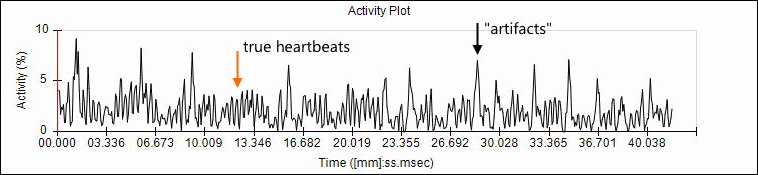
In the plot above, random peaks of high amplitude (due to noise or blood flow) mask the regular but lower true heartbeat signal. Zooming in can help identify which are the actual beats. DanioScope mistakenly selects the highest peak (around 15 BPM) from the power spectrum:
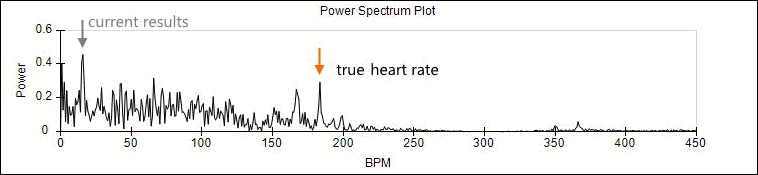
This leads DanioScope to incorrectly report a heart rate of 15 BPM.
How to Fix It
- Play the video and observe the region of the heart that visibly moves.
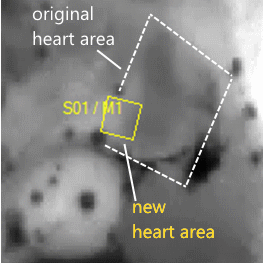
- Draw a smaller heart area tightly around that region.
- Rerun the acquisition.
Example of a well-defined heart area:
Now the correct peak (~180 BPM) is dominant in the power spectrum:
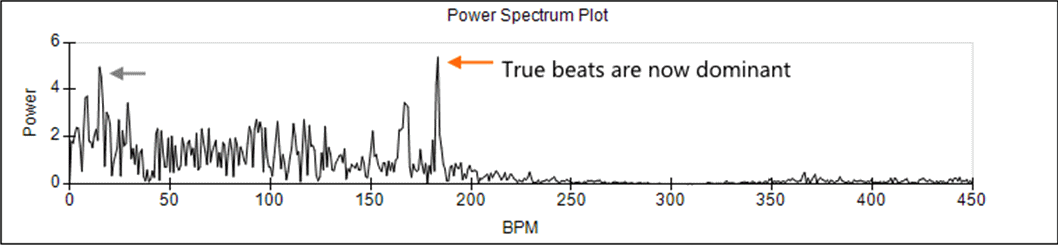
DanioScope now reports a heart rate of 183 BPM.
Validation
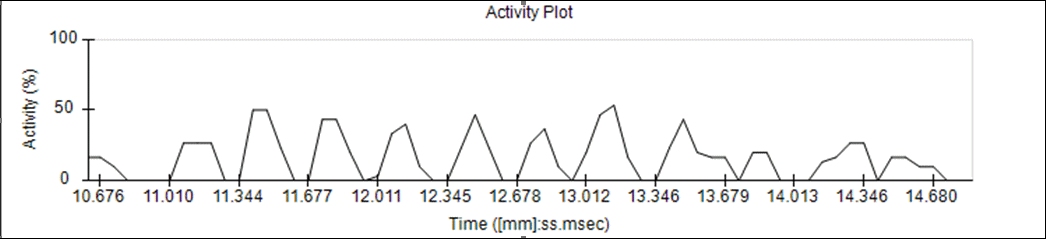
Zoom into the activity plot to verify that there are approximately 3 clear peaks per second, confirming the 180 BPM result:
Important Tips
- This method may not always work if video quality is too low.
- Always ensure optimal contrast and sharpness when recording videos to improve DanioScope’s detection accuracy.