What are the supported video file formats for EthoVision XT?
Last updated: Nov 07, 2025
Supported Video File Formats for EthoVision XT 12–16
EthoVision XT supports playback of the following digital video file formats:
- MPEG-1 – No longer supported in EthoVision XT 16.
- MPEG-2 – A collection of formats; not all are supported.
- MPEG-4 – A collection of formats; not all are supported.
- MPEG-4 (mp4v) in MP4 container – Created when recording with analog cameras on the Picolo Alert board.
- MPEG-4 DivX in AVI container – Format used by Media Recorder and EthoVision with digital cameras.
- H.264 AVC in MPEG container – Created by Media Recorder 2.5 and earlier with Euresys Picolo H.264 board.
- H.264 AVC in MP4 container – Created by Media Recorder 4.0 with the Picolo H.264 board.
- H.264 AVC – A type of MPEG-4 that is supported.
- DV-AVI – Uncompressed video from FireWire cameras. Not recommended due to large file size.
Important Notes:
- DV-AVI is a special case of AVI. EthoVision does not generally support AVI-format video files, even if the extension is
.avi. - MPEG-4 files may have the extensions
.mpg,.mpeg, or.avi, which does not guarantee compatibility. - Only MPEG-2, MPEG-4, and H.264 files created with Noldus-supplied encoder boards and Media Recorder are guaranteed to work.
Video Decoding Support
- MPEG-1 / MPEG-2: Decoded using MainConcept Decoder (installed with EthoVision XT)
- MPEG-4: Decoded using the standard Windows decoder
- H.264: Requires decoding software installed with EthoVision XT
Video Formats Not Supported
- DivX – except MPEG-4 DivX from Media Recorder
- WMV
- QuickTime (.mov)
- FLV (Flash / YouTube video)
- XviD variants of MPEG-4
Testing Other Formats
Some unsupported formats may still function. Check for Missing Samples and Interpolated Samples (in Detection Settings or Acquisition).
- If either metric is above 1% or shown in red, the video may be dropping frames or have inconsistent timing.
Determining the Format
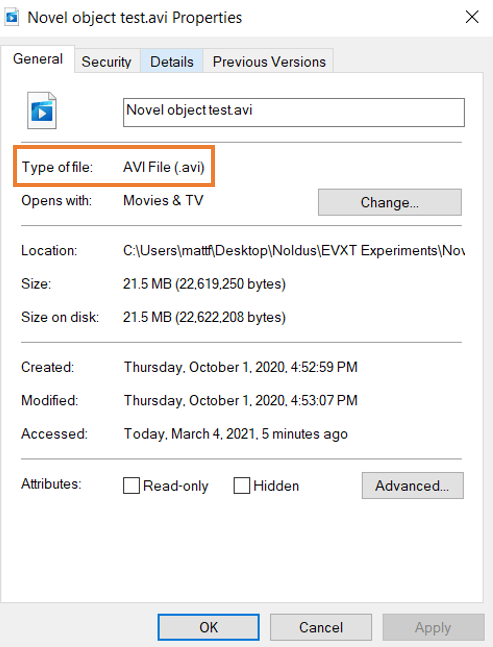
To check the format of your video:
- Right-click the file
- Select Properties
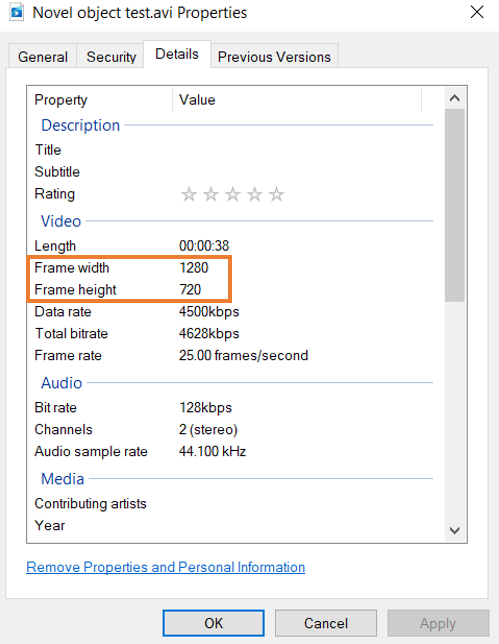
Video Resolution Requirements: Resolution must be at least 640 × 480 and no more than 1920 × 1200.
To check resolution:
- Right-click the video file
- Select Properties > Details
Converting Videos
If your video format is unsupported, use a converter to change the format to a compatible one.
MP4Converter (Recommended)
In the converter:
- Set Profile to General Video Format
Recommended Output Formats:
- Observer / FaceReader: DIVX, XVID, MPEG-1, or MPEG-2
- EthoVision / DanioScope: MPEG-1, MPEG-2, or DIVX
- For MTS files: Convert to DIVX or XVID (MPEG-1 and MPEG-2 often fail)
This tool offers a trial to convert the first 3 minutes of a video for compatibility testing.
Handbrake (Free)
Settings in Handbrake:
- Summary tab: Format = MP4
- Video tab: Codec = H.264, Frame Rate = “Same as Source”, enable Constant Framerate