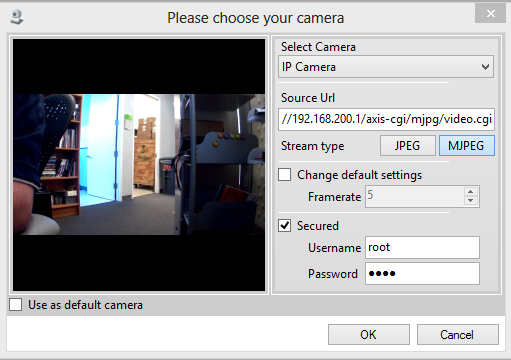
Selecting an Axis IP camera in FaceReader 6
Last updated: Nov 07, 2025
Adding an Axis IP Camera Stream
To add an Axis IP camera stream in your project:
- Click the Camera Analysis button to add a new camera analysis.
- Fill in the following settings:
- Select Camera: Choose IP Camera from the drop-down menu.
- Source URL: Use the format
http://xxx.xxx.xxx.xxx/axis-cgi/mjpg/video.cgi
Replacexxx.xxx.xxx.xxxwith the IP address of the camera (e.g.,192.168.200.1for the first camera). - Stream Type: Select MJPEG.
- Secured: Check this box and enter the camera’s username and password.