The Observer XT Error Id 12524 – Event Log Read Failure
Last updated: Nov 07, 2025
Error 12524 – Event Log Read Failure
The message "Event Log Read Failure" (Id 12524) indicates that the event log files cannot be found. These files are separate from the project file (the .vop file). If the files have been moved or separated from the rest of the project folder, this error will occur.
Files Missing or Out of Place
An Observer XT project is a folder named after your project, which contains:
- The
.vopfile - Subfolders including Event Data, Multimedia Files, Reliability Data, and others
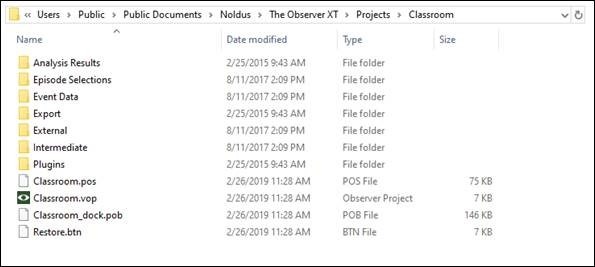
Note: Windows may hide file extensions (e.g. .vop), and older versions of Observer may not display Restore.btn files.
Crucially, observational data is stored in the Event Data folder, not in the .vop file. Each observation has its own file in this folder. If the .vop file is moved outside the project folder, Observer may recreate the folder structure but will be unable to locate the original data files—triggering the read failure.
Best Practices for Moving or Transferring Projects
To move a project between folders or computers:
- Always move the entire project folder — including the
.vopfile and all subfolders. - To make a duplicate: Use File > Save Project As inside Observer.
- To transfer to another computer: Use File > Make Backup to create a
.vpbfile. Move this file and use File > Restore Project on the new computer.
File Name Mismatch
The following project components must have matching names:
- The
.vopproject file - The
.posfile - The parent folder containing these files
If file names are changed and no longer match, especially after restoring from backup or renaming manually, you may encounter read errors or failure to open observations.