Subject renaming in TrackLab
Last updated: Nov 07, 2025
Managing Subject Names in TrackLab
TrackLab records location data from your subjects using wearable tags, such as a Sewio UWB tag attached to the collar of an animal. Each tag has a unique MAC identification number.
In the TrackLab Software, navigate to the Setup > Variables tab and open the Subject-Level page. There, you’ll find an overview of all tags detected within the selected session.
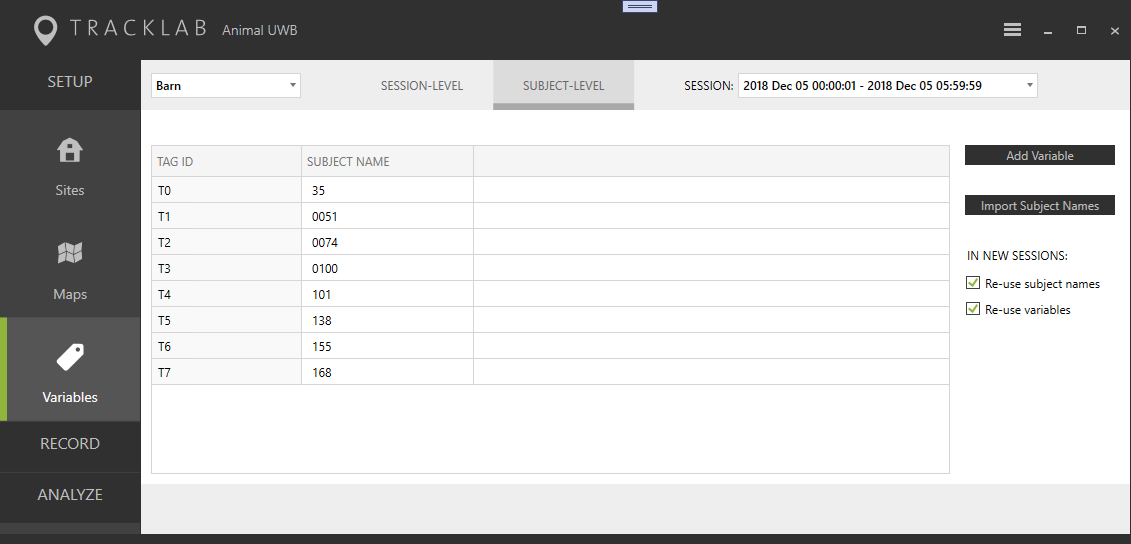
Subject Naming in TrackLab 2.12 and Later
As shown in the second column of the interface, each tag is initially identified by its tag ID. With TrackLab version 2.12 and later, users can assign more descriptive names to subjects. These user-defined names replace the default tag codes and are used consistently throughout the software interface and analysis outputs.
Subject Naming Rules
TrackLab treats each subject name as a unique identifier. The following rules apply:
- Unique per session: You cannot assign the same subject name to more than one tag within the same session.
- Consistent across sessions: A subject name used across different sessions (even across different sites) refers to the same subject.
- Site-specific analysis: Identical subject names can exist across sites, but analysis results in TrackLab are always limited to the selected site.