No vocalizations are seen in the UltraVox XT spectrogram
Last updated: Aug 24, 2026
One simple explanation is that the subject did not make vocalizations. However, it may be that the signal is so noisy that the calls do not emerge in the spectrogram.
The colors displayed in the spectrogram for one event also depend on the amplitude of the signal in the surrounding interval. The same call may appear or not (or appear less evident) if another, unwanted signal like strong noise (for example, a door being closed) or constant noise from electrical appliances occurs in the interval displayed.
To find out whether there is constant noise in the signal
- Under View, select Spectrum.
- Look at peaks in the spectrum. If necessary, zoom in the spectrum.
Examples:
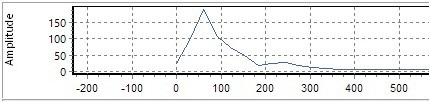
With strong noise at 60 Hz, zoom in the left part of the spectrum.
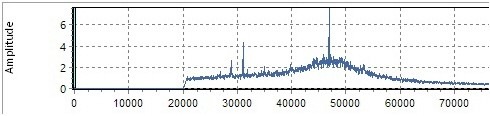
In another example, after filtering at 20000 Hz, two peaks are visible at 32kHz and 47 kHz.