Paw prints are not recognized by the Automatic Footprint Classification Module in CatWalk XT
Last updated: Aug 24, 2026
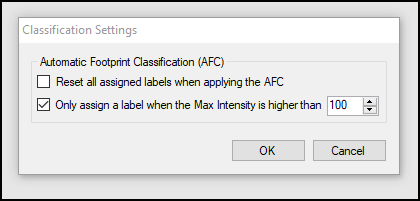
This may happen when a paw print has consistently a low Intensity, below the minimum set in the Classification Settings (which is 100 by default).
Prints with very low intensity may indicate that the Detection Settings are not optimal for your animals. You will get more reliable data by adjusting the Detection Settings so the prints are reliably detected. Also, always allow the walkway lights to reach their full brightness before running any trials, which can take up to 15 minutes. Turning on the walkway at least 15 minutes before running your first trial prevents any issue here. Runs acquired immediately after turning on the walkway may be dim.
However, for recordings you've already made, you can adjust the Classification Settings to better detect the dim prints. Go on the menu to Setup > Classification Settings. To the "Only assign a label..." option, reduce the value of minimum acceptable Max Intensity. Next, repeat automatic classification.