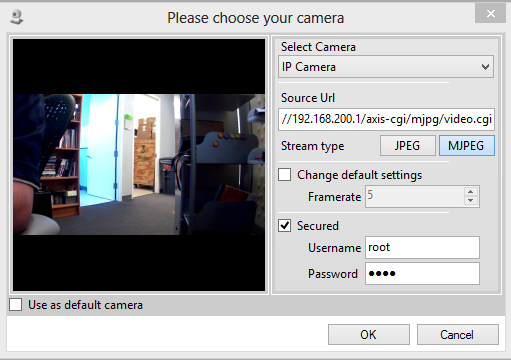
Selecting an Axis IP camera in FaceReader 6
Last updated: Aug 24, 2026
In your project, click the Camera Analysis button to add a new camera analysis. Fill in the settings as follows:
- Select Camera: Select "IP Camera" from the drop down menu.
- Source URL: See below.
- Stream Type: click MJPEG.
- Secured: Check the checkbox and fill in the username and password for the camera.
For the source URL, insert the camera stream URL which will be:
- http://xxx.xxx.xxx.xxx/axis-cgi/mjpg/video.cgi
Replace xxx.xxx.xxx.xxx with the IP address of the camera. Noldus typically sets up the first camera as 192.168.200.1, the second camera as 192.168.200.2, etc. Once these settings have been filled in, the video will appear in the preview screen on the left.
Check the checkbox for "Use as default camera" if you would like these settings to be used in the future.
Click OK to proceed.