The Observer XT Error Id 12524 – Event Log Read Failure
Last updated: Aug 24, 2026
The message "Event Log Read Failure" (Id 12524) indicates that the event log files cannot be found. These files are distinct from the project file (the .vop file) and if they have been separated from the rest of the project, this error will occur.
Files missing or out of place
A complete Observer XT project consists of a folder named for the project, containing a variety of files and subfolders. All of these together constitute the project:
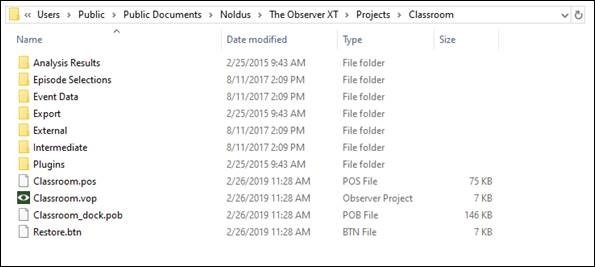
(Note that file extensions (e.g. “.vop”) may be hidden by Windows, and the Restore.btn files will not appear in older versions of The Observer.)
The observational data (the event logs) is not stored in the .vop file, it is stored in the Event Data folder, one file per event log. You should have the same number of files in that folder as you have observations.
If you move the .vop file, The Observer will create the Event Files folder (and the other folders) but it has no way to recreate the data because it no longer knows where that data is located. When you open an observation created before that move, this results in the Event Log Read Failure error. To solve this, you must locate the original folder that contained the experiment, where the .vop file was located and with the Event Files folder containing the required data files. This folder must have existed at one time, but it may have not been copied and the .vop file was moved without it.
Moving/transferring project files
If you would like to move a project, move the entire project folder and all of its contents. If you would like to make a new copy, open the project and go to File > ‘Save Project As’ to make a new copy.
To take a project from one computer to another, make a backup of the project by going to File > Make Backup. This will save the entire project as a single file with a .vpb extension. Take that file to the other computer and use the ‘Restore Project’ function to open the project up on the other PC. Doing so will create all the necessary files and folders.
Files renamed
The name of the project folder, .vop file, and .pos file all match the name of the project. If these names do not match, you may get an error if you make a backup of the project and then try to restore it.