Tracking from multiple video files (Batch processing) in EthoVision XT
Last updated: Aug 24, 2026
Tracking from multiple video files (Batch processing) in EthoVision XT.
Applies to: EthoVision XT (9.0 and later)
Description of issue:
If you recorded a series of video files outside of EthoVision or want to re-track video files that were recorded with EthoVision earlier you can use the Batch Processing functionality.
Solution
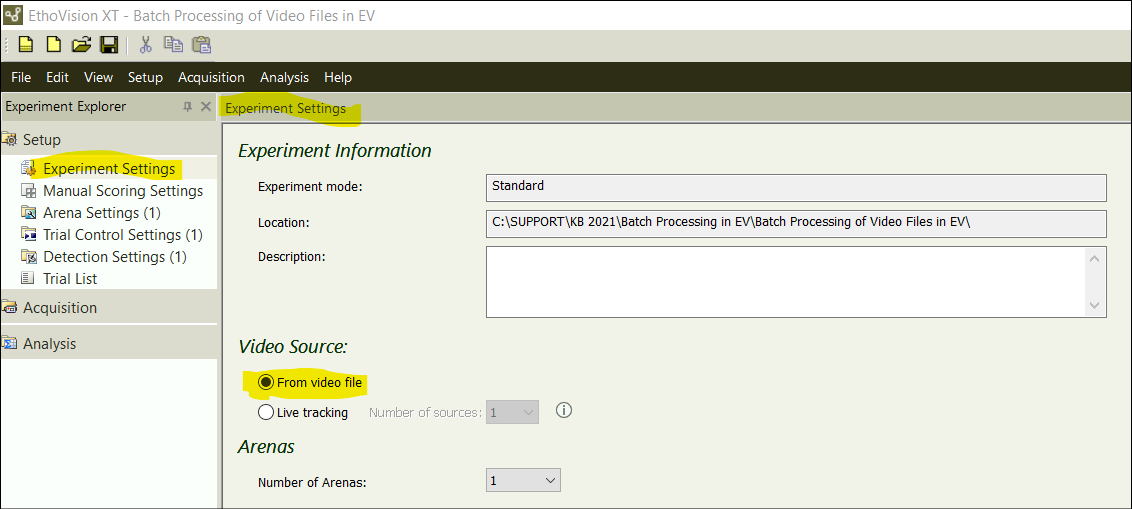
Under Experiment Settings, select ‘From video file’ as the Video Source:
The following example experiment has 2 Arena Settings and 2 Detection Settings:
Next, in the Trial List, click on ‘Add Videos’:
Browse to the video files and selected the ones to be added to the Trial List:
If all videos will be tracked using identical Arena Settings, Trial Settings, and Detection Settings, you simply select the desired settings (in blue) in the Experiment Explorer:
However, if these settings vary across video files, you need to select them for each video:
Please note that it is all or nothing: Either don’t select ANY settings or select one for EACH video.
Subsequently, in the Acquisition window, select ‘Track all planned trials’: