Why are my trials ending at an exact time (e.g., 10 minutes) even though my Trial Control Settings are set for longer?
Last updated: Aug 24, 2026
Solution: Uncheck the “Maximum Trial Duration” box in the Trial Control Settings.
If you are not getting any warning message when the trial ends (such as the error message “Trial duration does not correspond with system time”), then the likely issue is that you have the “Maximum Trial Duration” box checked in the Trial Control Settings.
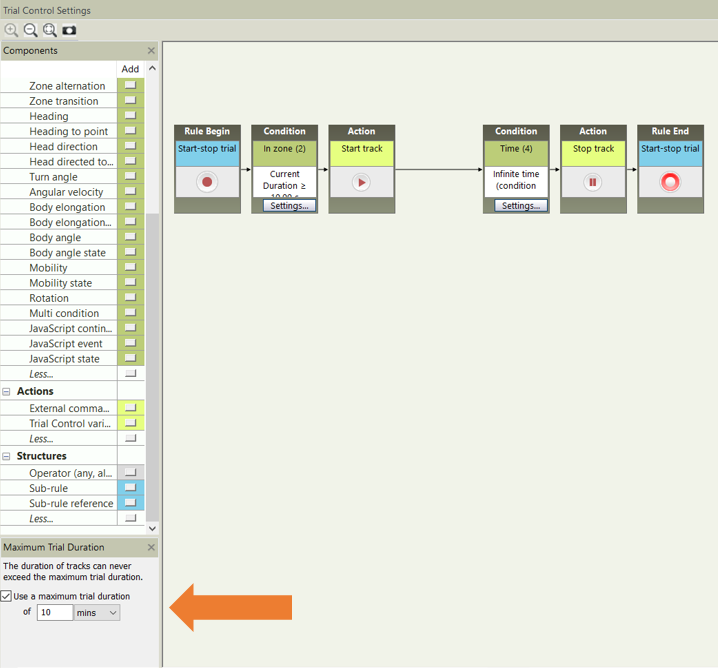
The purpose of that box is to end the trial independent of anything in the Trial Control Settings so that a trial does not exceed a certain amount of time that would be beyond the limits of what is expected. Given its independence from any condition in the Trial Control Settings, a clock for the specified time will start once the “Start trial” button is clicked in Acquisition and the trial will end once the time is reached.
Note: Any Trial Control Settings that have been used to acquire trials will be “locked” and cannot be altered. Thus, if you would like to run more trials in the same experiment with the same Trial Control Setting, but with the “Maximum Trial Duration” box unchecked, right-click on the Trial Control Settings you used and select “Duplicate”. That will make an exact “unlocked” copy. You can then uncheck that box and then use those Trial Control Settings for any future trials.