Paw prints are not recognized by the Automatic Footprint Classification Module in CatWalk XT
Last updated: Nov 07, 2025
Handling Dim Paw Prints in CatWalk XT
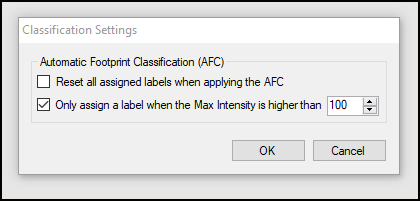
If a paw print is not being assigned a label during automatic classification, it may be due to low intensity values that fall below the threshold defined in the Classification Settings. By default, the minimum acceptable maximum intensity is set to 100.
Cause: Low Intensity Prints
Low intensity prints can occur if:
- The Detection Settings are not optimized for your specific animals.
- The walkway lights have not yet reached full brightness. It can take up to 15 minutes for full illumination after turning on the walkway.
Tip: Turn on the walkway at least 15 minutes before beginning trials to ensure consistent illumination. Trials started too soon after powering on the walkway may result in dim prints.
Solution for Future Trials
Adjust your Detection Settings to improve the visibility of the prints. This will ensure more consistent and reliable results during acquisition.
Solution for Existing Trials
To handle dim prints in previously recorded runs, you can adjust the classification threshold:
- Go to Setup > Classification Settings.
- Locate the setting labeled "Only assign a label to footprints with a maximum intensity above..."
- Lower the threshold value (e.g., reduce it from 100 to 80).
- Repeat automatic classification.