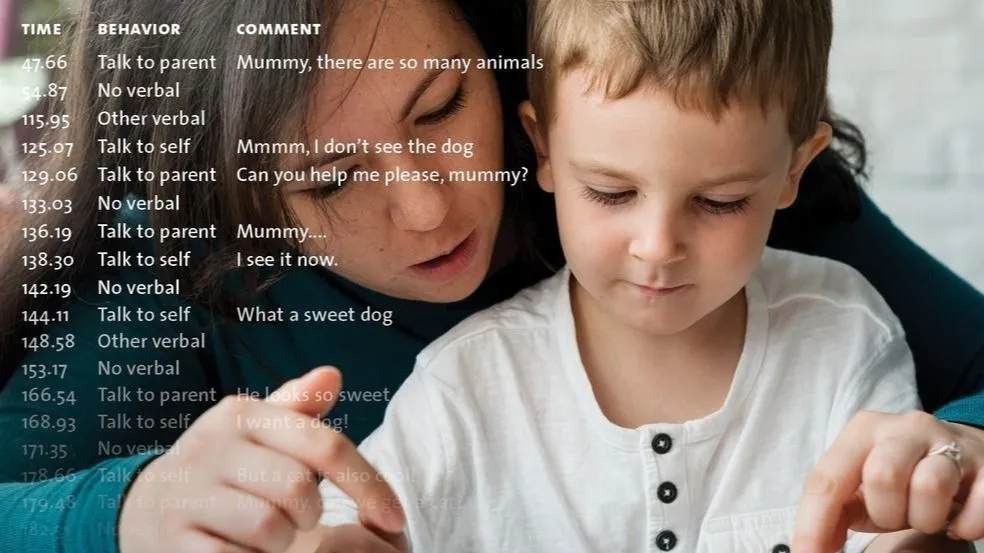
A setup checklist for The Observer: the five structural choices that decide whether your scheme works on the first video or works against you as your project progresses.
Creating a coding scheme can be one of the most challenging aspects of The Observer. This article provides a practical guide through the specific, structural decisions that are hard to reverse, in the order The Observer asks you to make them, so you can lock them in deliberately rather than discover them the hard way.
Pro Tip: How to use this
Treat the five sections below as a checklist. Before you start coding for real, make a conscious call on each one. If you can answer all five successfully, your coding scheme is very unlikely to need a painful rebuild later.
First, the vocabulary of The Observer
The language of The Observer may not match the language of the lab, and that is okay, but it is worth delineating before you build anything. A few terms do most of the work:
- Groups. All behaviors must be organized into groups. This governs how a keystroke knows when a behavior starts and stops.
- Continuous vs. instantaneous coding. Continuous means scoring behaviors as they happen. Instantaneous means scoring at regular intervals (every 30 seconds, every minute, and so on).
- States vs. points. Within continuous coding, a state has duration and a point does not.
- Start-stop vs. mutually exclusive. State groups can be start-stop (several behaviors may overlap) or mutually exclusive (only one behavior active at a time).
With those terms in hand, the five decisions below are much easier to make deliberately.
1. Point, state, or instantaneous: the choice that costs the most to get wrong
The single most common stumbling point comes when people choose a behavior type by thinking about the behavior. The right way to choose is to think about your endpoint - the number you intend to report at the end of the study. Work backward from that, and the type chooses itself.
| If you need... |
Then define as... |
Because... |
| How often (counts, rates) |
check_circlePoint event |
A point event marks an instant. It answers how many and how often, not how long. |
| How long (durations, % of time, overlap) |
check_circleState event |
A state event runs from start to stop, capturing duration and showing how behaviors overlap. |
| A snapshot at fixed moments |
check_circleInstantaneous sampling |
Score what is happening at set time points. Useful for long sessions where continuous coding is impractical. |
The reason this one is so unforgiving: the type is fixed the moment you score it. If you record a behavior as a point event and later decide you needed its duration, that information was never captured, and there is nothing to recover. Re-coding is the only fix. So, the question to settle before you touch the keyboard is simply: for each behavior, am I going to report how long, how often, or both?
Pro tip: Point events are frequency-based
A behavior with a genuinely negligible duration, such as an eye blink, a head nod, or a button press, is almost always a point event, even though it technically takes time. If you only need frequency, do not spend the time and energy recording its duration as a state event.
2. Why every behavior must be in a group, and what mutually exclusive entails
In The Observer, behaviors are never in isolation; each one belongs to a behavior group. This is not organizational tidiness - each group controls how keystrokes turn behaviors on and off. The decision you are really making per group is whether two behaviors in it can be true at the same time.
- Start-stop groups allow overlap. A behavior stays on until you explicitly stop it, and several can run at once. Use these when behaviors genuinely co-occur (for example, a child can be talking and walking simultaneously).
- Mutually exclusive groups allow only one behavior at a time. Starting one automatically stops the previous. This is the smart coding that keeps you from recording impossible states like sitting and standing at once.
A mutually exclusive group should also be exhaustive, meaning that one behavior from the group is active throughout the entire observation. In practice this means the group must include an initial state event, so the subject is in a defined state from the very first frame. Typically, this is a null behavior.
Pro Tip: The test to apply
For each mutually exclusive group, ask: At any given moment of the observation, is my subject always in exactly one of these states? If the honest answer is sometimes none of them, you are missing an other or null state. If the answer is sometimes two of them, the group should be start-stop, not mutually exclusive.
3. Keycodes: the conflict you will only notice mid-session
Keycodes are required, generated automatically, and case sensitive. The Observer will happily assign them for you, and you can set the length of each keystroke to 1, 2, or 3 keys. Two issues are worth settling before coding starts:
- Overlapping prefixes. If the length is 2 and one code is a prefix of another, The Observer will not register the behavior until you press the second key. Assign codes that are distinct from the first keystroke.
- Stop codes. For state events, decide deliberately how a behavior ends (the same key again, or a case switch) and make that consistent across the scheme. An extra shift key adds time and can introduce error for less-experienced coders.
Spend five minutes choosing codes that are mnemonic, conflict-free, and consistent.
4. Modifier or behavior? A decision, not a default
Modifiers are optional codes that specify a behavior (the recipient of an action, or the intensity of a response), and they can be nominal (a name) or numerical (a value). They can add a lot to your analysis, but do not reach for them as a default way to build a scheme. Use them only when you need them.
Decide, for each piece of detail you want to capture, whether it belongs in the structure of the scheme (a behavior) or as an attribute hanging off a behavior (a modifier). Make that decision deliberately.
Pro Tip: Keep it lean
Only include what answers your research question. If you are studying eating behavior, you do not need codes for talking. Every extra behavior, group, and modifier is something a coder must hold in mind. Restraint here is what keeps coding fast and reliable.
5. Design once, code many: getting the scheme onto every coder machine
If you have coder licenses for multiple coding stations, the scheme must be shared across those machines unchanged. The Observer has a designed sequence for exactly this:
- Build and finalize the coding scheme on one machine.
- Save the project as a template (an .otb file).
- Copy that template to each coding station.
- On each station, choose File - New Project from Template, so every coder starts from an identical scheme.
- When coding is done, each coder uses File - Export - Observational Data and saves an .odx file for merging back together.
The decision to make up front is simply to freeze the scheme before you distribute it. Lock the design, then distribute, then code.
Pro Tip: One scheme, many machines
Multiple coding stations require a floating license and/or coder license(s). The detailed procedure lives in the Technical Note Coder License, The Observer, and your local Noldus contact can walk you through licensing for your setup.
The five-question checklist
Before your first real coding session, you should be able to answer all five:
- For each behavior, am I reporting how long, how often, or both? (point vs. state vs. instantaneous)
- Is every mutually exclusive group exhaustive, with an initial state event?
- Are my keycodes distinct from the first keystroke, with consistent stop codes?
- Have I decided, on purpose, what is a behavior and what is a modifier?
- Is the scheme frozen before I distribute it to coder machines?
Answer those five and the coding scheme will save you time and effort. Every minute of design you invest before coding saves far more than a minute of re-coding after.
Keep going: Talk to a Specialist