My color Basler camera is monochrome in EthoVision XT
Last updated: Nov 07, 2025
Solution: Change the Color Space to YUY2 in EthoVision XT
In the Experiment Settings, click on the following icon to access a live image and open the Video Settings window:

This opens the live video feed and the settings interface:

In the Format tab of the Video Settings window, locate the Color Space field and change it to YUY2. After selecting, wait a few seconds for the image to update. Check the live preview to confirm the issue is resolved.
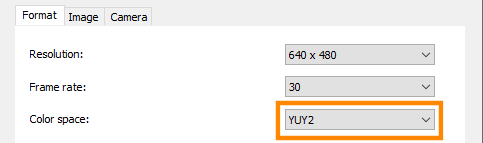
Note: The live image may take a few seconds to refresh after making any changes.
For experiments where a monochrome image is preferred, choose Y800 as the color space instead of YUY2.