Can I share my project with another user that has a different version of The Observer XT?
Last updated: Nov 07, 2025
Sharing Projects with Colleagues in The Observer XT
Solution 1: Your colleague is using the same or a newer version
If your colleague is using the same version or a newer version of The Observer XT, you can share your project by sending them a backup file:
- Open your project in The Observer XT.
- Go to File > Make Backup.
- Save the resulting
.vpbfile and send it to your colleague. - They can restore the backup by opening The Observer XT and selecting File > Restore Backup, then choosing the file you sent.
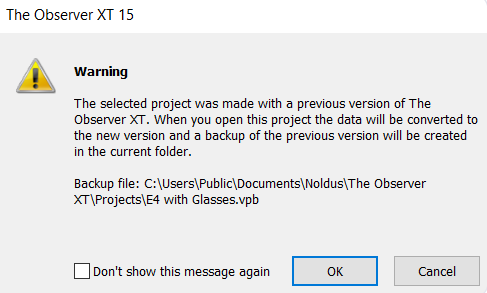
Note: If the backup is restored from an older version, your colleague will see a warning about upgrading the project. A safety backup in the original version will also be created.
Missing Backup Option?
If you or your colleague does not see Make Backup or Restore Backup in the File menu, you are likely using a Coder license.
- Go to Help > About The Observer XT > License Info.
- If the license number starts with
OC, it's a Coder license (limited functionality). - If it starts with
OB, it's a full license. - You must close the software before unplugging or switching license keys.
Hardware license keys are labeled accordingly:
- Observer Coder = Coder license
- Observer XT = Full license
Solution 2: Your colleague is using an older version
If your colleague is using an older version of The Observer XT, you should export and share your observation files (.odx files) instead:
- Open your project in The Observer XT.
- Go to File > Export > Observation Data > The Observer XT.
- Check Create separate file per observation and click OK.
- Send the resulting
.odxfiles to your colleague.
Your colleague can now:
- Open The Observer XT and go to File > New Project.
- Then go to File > Import > Observational Data and select the
.odxfiles.
The coding scheme used for the .odx files will be automatically recreated.
Note: This method works for Observer XT versions as low as 10.5.
Missing "New Project" Option?
If your colleague only sees New Project from Template under the File menu, they are likely using a Coder license and will need to use a full license to create new projects.