What is the best way to share my Observer project with another user? Can I simply send the .vop (Observer Project) file?
Last updated: Nov 07, 2025
Sharing The Observer XT Projects with Colleagues
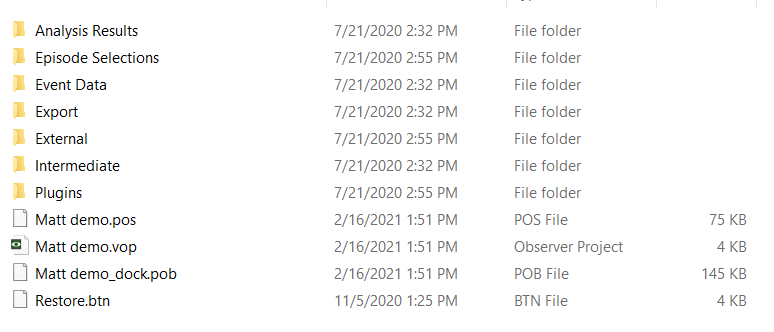
Note: The .vop file is not the entire project. It is just one component within a project folder, which includes various data and configuration files. The project folder should look something like this:
Solution 1: Colleague is using the same or newer version of The Observer XT
- Open your project.
- Go to File > Make Backup.
- Save the resulting
.vpbfile and send it to your colleague. - Your colleague can restore it via File > Restore Backup.
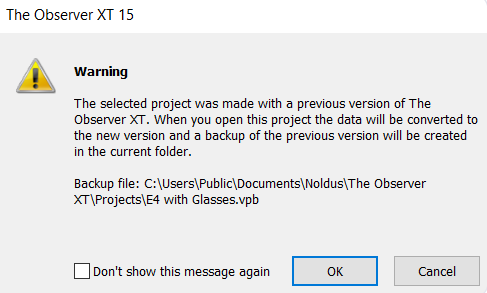
Note: If restoring from an older version, your colleague will see this upgrade warning:
Missing the Backup Options?
If the Make Backup or Restore Backup options are not available in the File menu, you are likely using a Coder license (license number starts with OC). A full license (starts with OB) is required to perform these actions.
- To check your license, go to Help > About The Observer XT > License Info.
- Close the software before unplugging or switching license keys.
- Physical dongles: "Observer Coder" = coder license, "Observer XT" = full license.
Solution 2: Colleague is using an older version of The Observer XT
If your colleague is using an older version than you, send them your observation files:
- Go to File > Export > Observation Data > The Observer XT.
- Check Create separate file per observation and click OK.
- Send the resulting
.odxfiles to your colleague.
Your colleague can:
- Open The Observer XT and go to File > New Project.
- Then go to File > Import > Observational Data and select the
.odxfiles.
The coding scheme used to create the observations will be automatically recreated.
Note: This method works with versions as old as The Observer XT 10.5.
Missing “New Project” Option?
If only “New Project from Template” appears in the File menu, a Coder license is in use. A full license is required to create new projects.