The Observer XT will not install and the resulting Log file says Access Denied 0x80070005
Last updated: Nov 07, 2025
Installation Fails with Error 0x80070005
This issue occurs when installing The Observer XT on your computer fails and the resulting log file shows the error code:
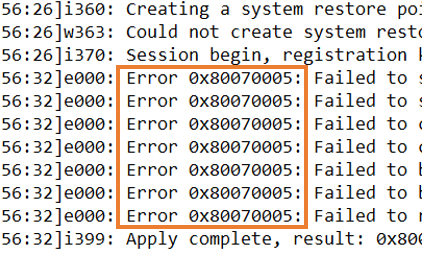
Log File: “Error 0x80070005”
After the installation fails, you may see a message like this in the log file:
Possible Causes
- Insufficient administrative rights: Your account may not have the required administrative rights to install software. Make sure you are logged in as an administrator, or ask your IT department for assistance.
- Pending Windows Updates: Windows might be in the middle of installing updates. Finish all pending updates and reboot the system before trying again.
- Malware or virus interference: Malware or a virus could have modified essential system files. Run a full system antivirus scan and resolve any issues found.
- Microsoft .NET installation problem: The installation may be failing while trying to install or use Microsoft .NET. Download and install the required version of Microsoft .NET Framework manually, then try installing the Noldus software again.